Export your code and publish to the App Store and Google Play.
Once you’ve built and tested your app in Bloom, you have two options for getting it into users’ hands:
Instant sharing (covered in Instant Sharing) — Share immediately with links and QR codes
App Store publishing (this guide) — Deploy to official app stores for public distribution
This guide covers publishing to the iOS App Store and Google Play Store for permanent, discoverable app listings.
Not sure which you need? If you’re testing, demoing, or building an internal tool, instant sharing is faster and easier. If you want public distribution, monetization, or app store credibility, follow this guide.
Why publish to app stores?
Discoverability
Users can find your app by searching app stores. You appear in categories, featured lists, and recommendations.
Credibility
Official app store listings build trust with users. Many people prefer downloading from stores they know.
Monetization
Sell your app, offer in-app purchases, or use subscription models through app store payment systems.
Push notifications
Full push notification support (iOS requires App Store distribution for reliable push).
Analytics & reviews
Access to app store analytics, user reviews, and ratings to improve your product.
Professional presence
Essential for businesses, brands, or apps serving large audiences.
Requirements for publishing
Plan requirements
Starter or Higher
Premium or Higher
Code export is available on Starter plans and above.
You can build and test iOS apps without this account using Bloom’s instant sharing. You only need it when you’re ready to publish officially.
Google Play Console
Cost: $25 one-time feeRequired for: Publishing to Google Play StoreSign up:play.google.com/consoleWhat you get:
Ability to publish apps to Play Store
Access to Play Console
Internal testing and beta tracks
App analytics and user feedback
Revenue reports (for paid apps)
Much cheaper than Apple’s yearly fee—just a one-time $25 payment and you can publish unlimited apps.
Exporting your code
Option 1: Download as ZIP (Starter+)
Click 'Download Code'
In the top right corner of the editor, click the Download Code button.
Download the ZIP file
Bloom bundles your current project version and downloads it as a ZIP file.The export includes:
Full Expo project (frontend)
Complete Convex deployment (backend)
Configuration files
Package dependencies
Environment setup instructions
Extract and explore
Unzip the file on your computer. You’ll see:
my-app/├── expo/ # Your frontend code├── convex/ # Your backend functions├── package.json # Dependencies├── README.md # Setup instructions└── ...
Your exported code is a standard Expo + Convex project. You can run it locally, deploy it to your own infrastructure, or publish it to app stores.
Option 2: GitHub Sync (Premium+)
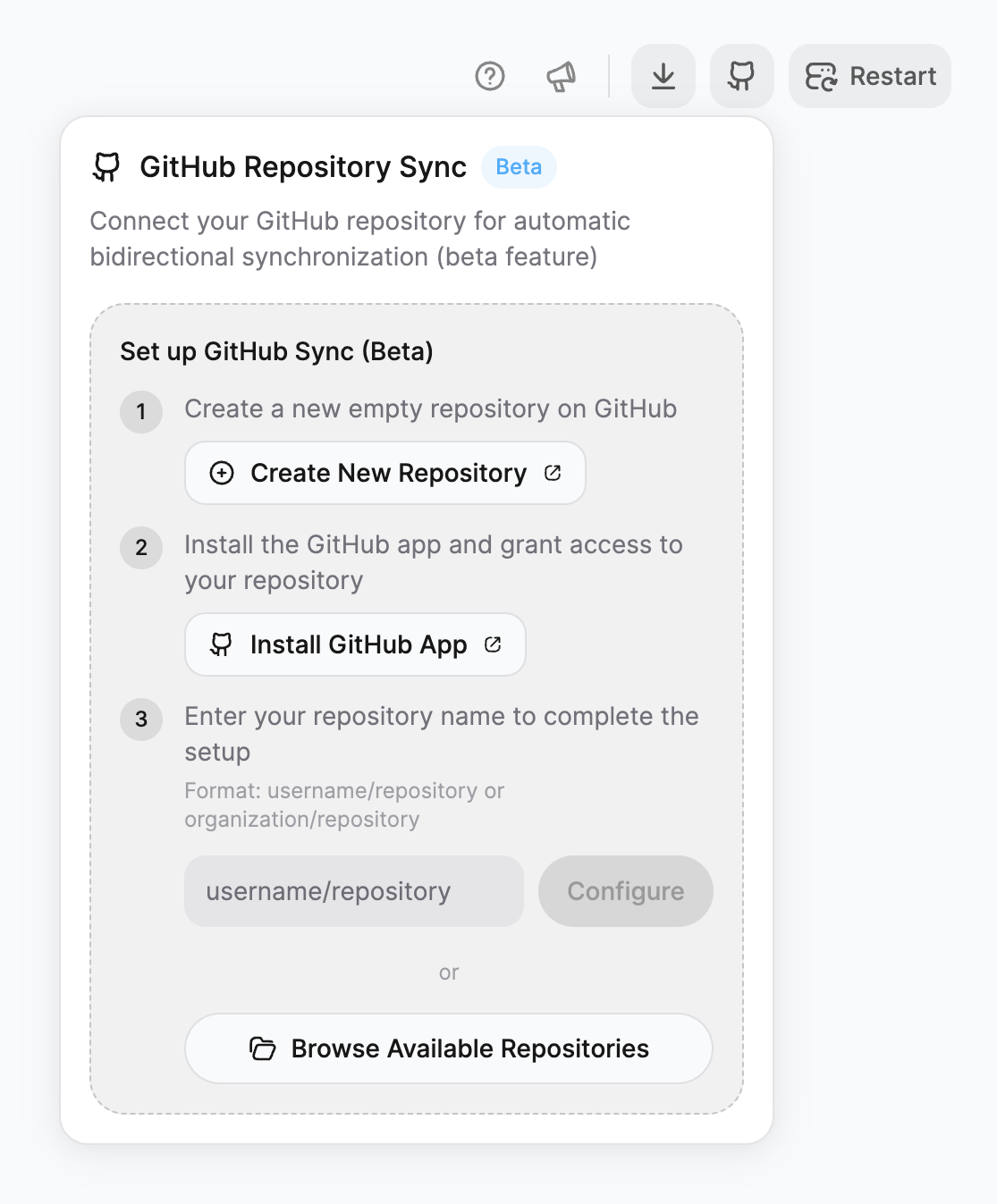
In the top right corner of the editor, click the GitHub Sync button.
1
Create a new empty repository on GitHub
Click Create New Repository to open GitHub directly. The repository must be empty for the initial sync to work correctly.
2
Install the GitHub App
Click Install GitHub App to install the Bloom GitHub App and grant it access to your repository. You can grant access to all repositories or only select repositories.
3
Enter your repository name
Enter your repository name in the format username/repository or organization/repository, then click Configure.You can also click Browse Available Repositories to select from repositories you’ve already granted access to.
Configure CI/CD (optional)
With your code in GitHub, you can set up automated workflows:
GitHub Actions for automated builds
Expo EAS for app store submissions
Automated testing on every commit
Deployment pipelines for staging and production
GitHub Sync is ideal for teams or developers who want version control and automated deployment workflows.
Upload to App Store Connect via Transporter or Xcode
Add screenshots, descriptions, and metadata
Submit for review
Apple review typically takes 1-3 days but can be longer. Monitor your submission status in App Store Connect.
App Review
Apple reviews your app for:
Compliance with App Store guidelines
Privacy policy requirements
Functionality and crashes
Accurate metadata
If approved, your app goes live automatically (or on your scheduled release date).If rejected, you’ll receive feedback and can resubmit after making changes.
Learn more about iOS publishing
Expo’s comprehensive guide to App Store submission
Choose apk for testing or aab (Android App Bundle) for Play Store submission.
For Play Store, always use aab format—it’s required and provides smaller download sizes.
Upload to Play Console
In Play Console, go to Production → Create new release
Upload your .aab file from EAS
Add release notes
Review and roll out
You can also use internal testing or closed testing tracks before going to production.
Complete store listing
Fill out all required fields in Play Console:
App details (name, description, category)
Graphics (icon, feature graphic, screenshots)
Categorization (app category, tags)
Contact details (email, website, privacy policy)
Content rating
Target audience and content
Play Store requires more detailed content ratings than iOS. Complete the questionnaire carefully.
Submit for review
Once all required fields are complete:
Click Review release
Check for any errors or warnings
Click Start rollout to Production
Google’s review is typically faster than Apple’s (often within hours to 1 day).
Learn more about Android publishing
Expo’s comprehensive guide to Play Store submission
Managing your backend
After publishing, your Convex backend continues to run and scale automatically. You can:
Monitor in Bloom
Keep using Bloom’s Backend Dashboard to monitor health, view logs, and manage data.
Manage directly in Convex
Your Convex deployment is accessible at the URL shown in your Backend Dashboard settings. Open in a new tab for full Convex dashboard access.
Your Convex deployment URL remains the same after publishing. Your published app connects to the same backend you use in Bloom.
Updating your published app
For apps exported as ZIP:
1
Make changes in Bloom
Continue editing your app in Bloom to add features, fix bugs, or update UI.
2
Export updated code
Download a fresh ZIP export when you’re ready to publish an update.
3
Build and submit new version
Update version number in app.json
Build with EAS: eas build --platform ios|android
Submit new build to app stores
For apps with GitHub sync:
1
Changes sync automatically
Your GitHub repo updates as you work in Bloom.
2
Trigger CI/CD pipeline
If you’ve set up GitHub Actions or automated builds, they run automatically on new commits.
3
Submit new version
Automated pipelines can submit directly to app stores, or you can trigger manually.
Over-the-air updates: With Expo’s EAS Update, you can push JavaScript changes to users instantly without resubmitting to app stores. Native changes still require new builds.
Common publishing questions
How long does app review take?
Apple App Store: 1-3 days on average (sometimes longer)
Google Play Store: Hours to 1 day typically
First submissions often take longer as reviewers are more thorough.
What if my app gets rejected?
Both stores will provide reasons for rejection. Common issues:
Missing privacy policy
Crashes or bugs
Metadata that doesn’t match functionality
Violations of content guidelines
Fix the issues and resubmit. You can appeal if you believe the rejection is incorrect.
Do I need to rebuild for every change?
Native changes: Yes, anything that modifies native code, dependencies, or app configuration requires a new build and submission.JavaScript changes: No. Use Expo’s EAS Update to push JS changes instantly without rebuilding.
Can I test before publishing?
Yes! Both platforms offer testing options:
iOS: Use TestFlight for beta testing
Android: Use internal testing or closed testing tracks
You can also continue using Bloom’s instant sharing for quick testing.
What about environment variables and API keys?
After exporting:
Configure environment variables in your build profiles (EAS)
Keep sensitive keys in .env files (never commit to GitHub)
Use Expo’s secure storage for production credentials
Your Convex backend URL is automatically included in the build.
How do I handle app store fees?
Apple: 30% commission on paid apps and in-app purchases (15% for small businesses earning under $1M/year)
Google: 15% commission on first $1M, then 30% after
Free apps with no in-app purchases have no commissions.
What’s next?
Monitor with Backend Dashboard
Track performance and health as users start using your published app.
View Logs
Debug issues and monitor user activity in production.
Expo EAS Documentation
Learn advanced build and deployment workflows with Expo.
Convex Production Hosting
Understand how your backend scales and how to optimize for production.
Need help publishing?
Contact Bloom support for assistance with app store submission and deployment.
Was this page helpful?
{"docsConfig":{"theme":"mint","$schema":"https://mintlify.com/docs.json","name":"Bloom","description":"Create full-stack native apps with AI","colors":{"primary":"#2EA1F3","light":"#F5F3FF","dark":"#FF7DAD"},"logo":{"light":"https://mintcdn.com/bloom-eafef039/V5DGM7pehs6HGA75/images/bloom-logo-light.png?fit=max\u0026auto=format\u0026n=V5DGM7pehs6HGA75\u0026q=85\u0026s=ec1e694a7c5372d8b2d6202b38c17ae3","dark":"https://mintcdn.com/bloom-eafef039/V5DGM7pehs6HGA75/images/bloom-logo-dark.png?fit=max\u0026auto=format\u0026n=V5DGM7pehs6HGA75\u0026q=85\u0026s=d4f624dabec98bc7f06a501231332827","href":"https://bloom.diy/"},"favicon":"https://mintcdn.com/bloom-eafef039/V5DGM7pehs6HGA75/images/favicon.png?fit=max\u0026auto=format\u0026n=V5DGM7pehs6HGA75\u0026q=85\u0026s=f173e45b79d7cf2d3d5026793971cdc9","background":{"decoration":"gradient","color":{"light":"#F9FAFB","dark":"#080808"}},"navbar":{"links":[{"href":"https://discord.com/invite/ZC3zgARtUY","type":"discord"}],"primary":{"type":"button","label":"Dashboard","href":"https://bloom.diy/"}},"footer":{"socials":{"linkedin":"https://www.linkedin.com/company/bloomlabs-inc","x":"https://x.com/CreateWithBloom","youtube":"https://www.youtube.com/@CreateWithBloom"}},"fonts":{"family":"Inter"},"integrations":{"intercom":{"appId":"t9im3l10"},"posthog":{"apiKey":"phc_Ysdg4mGIW3VBgO0bCt4aAS1mXp0lX5aak6hHqgcxxKO","apiHost":"https://us.i.posthog.com"}},"contextual":{"options":["copy","view","chatgpt","claude","perplexity","mcp","cursor","vscode"],"display":"header"},"styling":{"latex":true},"navigation":{"pages":[]}},"deployment":{"deploymentMetadataValue":{"subdomain":"bloom-eafef039","hasAudioNarration":false,"actualSubdomain":"bloom-eafef039","customDomains":["docs.bloom.diy"],"gitSource":{"type":"github","owner":"bloomlabsinc","repo":"docs","deployBranch":"main","contentDirectory":"","isPrivate":true,"mountPath":"","label":""},"feedback":{"thumbs":true},"entitlements":{"AI_CHAT":{"status":"ENABLED"},"WEB_MCP":{"status":"ENABLED"},"NARRATION":{"status":"ENABLED"}},"buildId":"6b0110dd1052afd92812d4f0","clientVersion":"0.0.4342","searchFilterCounts":[{"language":"default","tag":"Features","count":16},{"language":"default","tag":"Introduction","count":11},{"language":"default","tag":"Tips \u0026 Tricks","count":5},{"language":"default","tag":"Code","count":4},{"language":"default","tag":"Getting Started","count":4},{"language":"default","tag":"Build Your First App","count":4},{"language":"default","tag":"Platforms","count":3},{"language":"default","tag":"Quick References","count":3},{"language":"default","tag":"Changelog","count":2},{"language":"default","tag":"Connect AI clients","count":1}]},"assistantConfig":{"enableAskAiButton":false,"enableStarterQuestions":false,"enableAskAiSearchBar":true,"deflection":{"enabled":true,"email":"team@bloom.diy","showHelpButton":true}},"basePath":"","hasChatPermissions":true,"hasWebMcpPermissions":true,"toggles":[{"name":"kill-isr","enabled":true,"variant":{"name":"disabled","enabled":false,"feature_enabled":true},"impressionData":false},{"name":"custom-rbac-roles","enabled":true,"variant":{"name":"disabled","enabled":false,"feature_enabled":true},"impressionData":false},{"name":"agent-mintlify-slack","enabled":true,"variant":{"name":"disabled","enabled":false,"feature_enabled":true},"impressionData":false},{"name":"agent-integrations-settings","enabled":true,"variant":{"name":"disabled","enabled":false,"feature_enabled":true},"impressionData":false},{"name":"rbac-expansion","enabled":true,"variant":{"name":"disabled","enabled":false,"feature_enabled":true},"impressionData":false},{"name":"automations-pr-grouping","enabled":true,"variant":{"name":"disabled","enabled":false,"feature_enabled":true},"impressionData":false},{"name":"custom-prefix","enabled":true,"variant":{"name":"disabled","enabled":false,"feature_enabled":true},"impressionData":false},{"name":"analytics-v7","enabled":true,"variant":{"name":"disabled","enabled":false,"feature_enabled":true},"impressionData":false},{"name":"user-flows-analytics","enabled":true,"variant":{"name":"disabled","enabled":false,"feature_enabled":true},"impressionData":false},{"name":"no-publish-flow","enabled":true,"variant":{"name":"disabled","enabled":false,"feature_enabled":true},"impressionData":false},{"name":"snapshot-serving-live","enabled":true,"variant":{"name":"disabled","enabled":false,"feature_enabled":true},"impressionData":false},{"name":"stripTemperatureMiddleware","enabled":true,"variant":{"name":"disabled","enabled":false,"feature_enabled":true},"impressionData":false},{"name":"support-platform-pylon-zendesk","enabled":true,"variant":{"name":"disabled","enabled":false,"feature_enabled":true},"impressionData":false},{"name":"snapshot-serving","enabled":true,"variant":{"name":"disabled","enabled":false,"feature_enabled":true},"impressionData":false},{"name":"instant-rollback","enabled":true,"variant":{"name":"disabled","enabled":false,"feature_enabled":true},"impressionData":false},{"name":"granular-notifications-server","enabled":true,"variant":{"name":"disabled","enabled":false,"feature_enabled":true},"impressionData":false},{"name":"granular-notifications","enabled":true,"variant":{"name":"disabled","enabled":false,"feature_enabled":true},"impressionData":false},{"name":"automations-fable","enabled":true,"variant":{"name":"disabled","enabled":false,"feature_enabled":true},"impressionData":false},{"name":"fixed-ai-action-pricing","enabled":true,"variant":{"name":"disabled","enabled":false,"feature_enabled":true},"impressionData":false},{"name":"site-roles","enabled":true,"variant":{"name":"disabled","enabled":false,"feature_enabled":true},"impressionData":false},{"name":"automation-resolve-merge-conflict","enabled":true,"variant":{"name":"disabled","enabled":false,"feature_enabled":true},"impressionData":false},{"name":"scoped-publishing","enabled":true,"variant":{"name":"disabled","enabled":false,"feature_enabled":true},"impressionData":false},{"name":"mintql","enabled":true,"variant":{"name":"disabled","enabled":false,"feature_enabled":true},"impressionData":false},{"name":"page-level-analytics","enabled":true,"variant":{"name":"disabled","enabled":false,"feature_enabled":true},"impressionData":false},{"name":"editor-version-history-v2","enabled":true,"variant":{"name":"disabled","enabled":false,"feature_enabled":true},"impressionData":false},{"name":"billing-page-v2","enabled":true,"variant":{"name":"disabled","enabled":false,"feature_enabled":true},"impressionData":false},{"name":"full-page-search","enabled":true,"variant":{"name":"disabled","enabled":false,"feature_enabled":true},"impressionData":false},{"name":"workspace-projects","enabled":true,"variant":{"name":"disabled","enabled":false,"feature_enabled":true},"impressionData":false},{"name":"fork-pr-previews","enabled":true,"variant":{"name":"disabled","enabled":false,"feature_enabled":true},"impressionData":false},{"name":"revalidation-jwt","enabled":true,"variant":{"name":"disabled","enabled":false,"feature_enabled":true},"impressionData":false},{"name":"hobby-abuse-scan","enabled":true,"variant":{"name":"disabled","enabled":false,"feature_enabled":true},"impressionData":false},{"name":"dashboard-inbox","enabled":true,"variant":{"name":"disabled","enabled":false,"feature_enabled":true},"impressionData":false},{"name":"turbopuffer-dual-write","enabled":true,"variant":{"name":"disabled","enabled":false,"feature_enabled":true},"impressionData":false},{"name":"approve-review-flow","enabled":true,"variant":{"name":"disabled","enabled":false,"feature_enabled":true},"impressionData":false},{"name":"editor-metadata","enabled":true,"variant":{"name":"disabled","enabled":false,"feature_enabled":true},"impressionData":false},{"name":"turbopuffer-serve","enabled":true,"variant":{"name":"disabled","enabled":false,"feature_enabled":true},"impressionData":false},{"name":"live-agents","enabled":true,"variant":{"name":"disabled","enabled":false,"feature_enabled":true},"impressionData":false},{"name":"starter-pricing","enabled":true,"variant":{"name":"treatment","enabled":true,"payload":{"type":"string","value":"treatment"},"feature_enabled":true},"impressionData":false},{"name":"llms-txt-v2","enabled":true,"variant":{"name":"disabled","enabled":false,"feature_enabled":true},"impressionData":false},{"name":"wildcard-email-auth","enabled":true,"variant":{"name":"disabled","enabled":false,"feature_enabled":true},"impressionData":false}],"starterQuestions":[],"googleFontsInlined":false},"customCss":[]}
{"page":{"pagePath":"deploying-your-app","slug":"/deploying-your-app","pageMetadata":{"title":"Deploying Your App","description":"Export your code and publish to the App Store and Google Play.","icon":"rocket","href":"/deploying-your-app"},"description":{"compiledSource":"\"use strict\";\nconst {jsx: _jsx} = arguments[0];\nconst {useMDXComponents: _provideComponents} = arguments[0];\nfunction _createMdxContent(props) {\n const _components = {\n p: \"p\",\n ..._provideComponents(),\n ...props.components\n };\n return _jsx(_components.p, {\n children: \"Export your code and publish to the App Store and Google Play.\"\n });\n}\nfunction MDXContent(props = {}) {\n const {wrapper: MDXLayout} = {\n ..._provideComponents(),\n ...props.components\n };\n return MDXLayout ? _jsx(MDXLayout, {\n ...props,\n children: _jsx(_createMdxContent, {\n ...props\n })\n }) : _createMdxContent(props);\n}\nreturn {\n default: MDXContent\n};\n","frontmatter":{},"scope":{}},"pageType":"default","mdx":{"mdxSource":{"compiledSource":"\"use strict\";const{Fragment:_Fragment,jsx:_jsx,jsxs:_jsxs}=arguments[0];const{useMDXComponents:_provideComponents}=arguments[0];function _createMdxContent(props){const _components={a:`a`,code:`code`,li:`li`,ol:`ol`,p:`p`,pre:`pre`,span:`span`,strong:`strong`,ul:`ul`,..._provideComponents(),...props.components},{Accordion,AccordionGroup,Card,CardGroup,Check,CodeBlock,Frame,Heading,Info,Note,OptimizedImage,Step,Steps,Tab,Tabs,Tip,Warning}=_components;if(!Accordion)_missingMdxReference(`Accordion`,true);if(!AccordionGroup)_missingMdxReference(`AccordionGroup`,true);if(!Card)_missingMdxReference(`Card`,true);if(!CardGroup)_missingMdxReference(`CardGroup`,true);if(!Check)_missingMdxReference(`Check`,true);if(!CodeBlock)_missingMdxReference(`CodeBlock`,true);if(!Frame)_missingMdxReference(`Frame`,true);if(!Heading)_missingMdxReference(`Heading`,true);if(!Info)_missingMdxReference(`Info`,true);if(!Note)_missingMdxReference(`Note`,true);if(!OptimizedImage)_missingMdxReference(`OptimizedImage`,true);if(!Step)_missingMdxReference(`Step`,true);if(!Steps)_missingMdxReference(`Steps`,true);if(!Tab)_missingMdxReference(`Tab`,true);if(!Tabs)_missingMdxReference(`Tabs`,true);if(!Tip)_missingMdxReference(`Tip`,true);if(!Warning)_missingMdxReference(`Warning`,true);return _jsxs(_Fragment,{children:[_jsx(_components.p,{children:`Once you’ve built and tested your app in Bloom, you have two options for getting it into users’ hands:`}),`\n`,_jsxs(_components.ol,{children:[`\n`,_jsxs(_components.li,{children:[_jsx(_components.strong,{children:`Instant sharing`}),` (covered in `,_jsx(_components.a,{href:`/instant-sharing`,children:`Instant Sharing`}),`) — Share immediately with links and QR codes`]}),`\n`,_jsxs(_components.li,{children:[_jsx(_components.strong,{children:`App Store publishing`}),` (this guide) — Deploy to official app stores for public distribution`]}),`\n`]}),`\n`,_jsxs(_components.p,{children:[`This guide covers `,_jsx(_components.strong,{children:`publishing to the iOS App Store and Google Play Store`}),` for permanent, discoverable app listings.`]}),`\n`,_jsx(Info,{children:_jsxs(_components.p,{children:[_jsx(_components.strong,{children:`Not sure which you need?`}),` If you’re testing, demoing, or building an internal tool, `,_jsx(_components.a,{href:`/instant-sharing`,children:`instant sharing`}),` is faster and easier. If you want public distribution, monetization, or app store credibility, follow this guide.`]})}),`\n`,_jsx(Heading,{level:`2`,id:`why-publish-to-app-stores`,children:`Why publish to app stores?`}),`\n`,_jsxs(CardGroup,{cols:2,children:[_jsx(Card,{title:`Discoverability`,icon:`magnifying-glass`,children:_jsx(_components.p,{children:`Users can find your app by searching app stores. You appear in categories, featured lists, and recommendations.`})}),_jsx(Card,{title:`Credibility`,icon:`shield-check`,children:_jsx(_components.p,{children:`Official app store listings build trust with users. Many people prefer downloading from stores they know.`})}),_jsx(Card,{title:`Monetization`,icon:`dollar-sign`,children:_jsx(_components.p,{children:`Sell your app, offer in-app purchases, or use subscription models through app store payment systems.`})}),_jsx(Card,{title:`Push notifications`,icon:`bell`,children:_jsx(_components.p,{children:`Full push notification support (iOS requires App Store distribution for reliable push).`})}),_jsx(Card,{title:`Analytics \u0026 reviews`,icon:`chart-bar`,children:_jsx(_components.p,{children:`Access to app store analytics, user reviews, and ratings to improve your product.`})}),_jsx(Card,{title:`Professional presence`,icon:`briefcase`,children:_jsx(_components.p,{children:`Essential for businesses, brands, or apps serving large audiences.`})})]}),`\n`,_jsx(Heading,{level:`2`,id:`requirements-for-publishing`,children:`Requirements for publishing`}),`\n`,_jsx(Heading,{level:`3`,id:`plan-requirements`,children:`Plan requirements`}),`\n`,_jsxs(Tabs,{children:[_jsxs(Tab,{title:`Starter or Higher`,id:`starter-or-higher`,children:[_jsxs(_components.p,{children:[_jsx(_components.strong,{children:`Code export`}),` is available on Starter plans and above.`]}),_jsx(Check,{children:_jsx(_components.p,{children:`Export your full Expo + Convex project as a ZIP`})}),_jsx(Check,{children:_jsx(_components.p,{children:`Deploy to any hosting platform`})}),_jsx(Check,{children:_jsx(_components.p,{children:`Publish to app stores`})}),_jsx(_components.p,{children:_jsx(_components.a,{href:`/pricing-and-credits`,children:`View pricing →`})})]}),_jsxs(Tab,{title:`Premium or Higher`,id:`premium-or-higher`,children:[_jsxs(_components.p,{children:[_jsx(_components.strong,{children:`GitHub sync`}),` is available on Premium plans and above.`]}),_jsx(Check,{children:_jsx(_components.p,{children:`Two-way sync with GitHub`})}),_jsx(Check,{children:_jsx(_components.p,{children:`Automatic code pushes`})}),_jsx(Check,{children:_jsx(_components.p,{children:`Integrate with CI/CD pipelines`})}),_jsx(Check,{children:_jsx(_components.p,{children:`Use GitHub Actions for automated builds`})}),_jsx(_components.p,{children:_jsx(_components.a,{href:`/pricing-and-credits`,children:`View pricing →`})})]})]}),`\n`,_jsx(Heading,{level:`3`,id:`developer-accounts`,children:`Developer accounts`}),`\n`,_jsx(_components.p,{children:`To publish to app stores, you’ll need:`}),`\n`,_jsxs(AccordionGroup,{children:[_jsxs(Accordion,{title:`Apple Developer Program`,icon:`apple`,id:`apple-developer-program`,children:[_jsxs(_components.p,{children:[_jsx(_components.strong,{children:`Cost:`}),` $99/year`]}),_jsxs(_components.p,{children:[_jsx(_components.strong,{children:`Required for:`}),` Publishing to the iOS App Store`]}),_jsxs(_components.p,{children:[_jsx(_components.strong,{children:`Sign up:`}),` `,_jsx(_components.a,{href:`https://developer.apple.com/programs/`,children:`developer.apple.com/programs`})]}),_jsx(_components.p,{children:_jsx(_components.strong,{children:`What you get:`})}),_jsxs(_components.ul,{children:[`\n`,_jsx(_components.li,{children:`Ability to submit apps to App Store`}),`\n`,_jsx(_components.li,{children:`Access to App Store Connect`}),`\n`,_jsx(_components.li,{children:`TestFlight for beta testing`}),`\n`,_jsx(_components.li,{children:`App analytics and sales reports`}),`\n`,_jsx(_components.li,{children:`Certificate and provisioning profile management`}),`\n`]}),_jsx(Info,{children:_jsx(_components.p,{children:`You can build and test iOS apps without this account using Bloom’s instant sharing. You only need it when you’re ready to publish officially.`})})]}),_jsxs(Accordion,{title:`Google Play Console`,icon:`google`,id:`google-play-console`,children:[_jsxs(_components.p,{children:[_jsx(_components.strong,{children:`Cost:`}),` $25 one-time fee`]}),_jsxs(_components.p,{children:[_jsx(_components.strong,{children:`Required for:`}),` Publishing to Google Play Store`]}),_jsxs(_components.p,{children:[_jsx(_components.strong,{children:`Sign up:`}),` `,_jsx(_components.a,{href:`https://play.google.com/console/`,children:`play.google.com/console`})]}),_jsx(_components.p,{children:_jsx(_components.strong,{children:`What you get:`})}),_jsxs(_components.ul,{children:[`\n`,_jsx(_components.li,{children:`Ability to publish apps to Play Store`}),`\n`,_jsx(_components.li,{children:`Access to Play Console`}),`\n`,_jsx(_components.li,{children:`Internal testing and beta tracks`}),`\n`,_jsx(_components.li,{children:`App analytics and user feedback`}),`\n`,_jsx(_components.li,{children:`Revenue reports (for paid apps)`}),`\n`]}),_jsx(Tip,{children:_jsx(_components.p,{children:`Much cheaper than Apple’s yearly fee—just a one-time $25 payment and you can publish unlimited apps.`})})]})]}),`\n`,_jsx(Heading,{level:`2`,id:`exporting-your-code`,children:`Exporting your code`}),`\n`,_jsx(Heading,{level:`3`,id:`option-1-download-as-zip-starter+`,children:`Option 1: Download as ZIP (Starter+)`}),`\n`,_jsxs(Steps,{children:[_jsxs(Step,{title:`Click 'Download Code'`,icon:`download`,children:[_jsxs(_components.p,{children:[`In the top right corner of the editor, click the `,_jsx(_components.strong,{children:`Download Code`}),` button.`]}),_jsx(Frame,{children:_jsx(OptimizedImage,{src:`https://mintcdn.com/bloom-eafef039/6Jj6W1TQ2_0nANBi/images/download-code.png?fit=max\u0026auto=format\u0026n=6Jj6W1TQ2_0nANBi\u0026q=85\u0026s=b6b41c56c6f97cf7dd81b31925d745c5`,alt:`Download Code button`,\"data-og-width\":`788`,width:`788`,\"data-og-height\":`260`,height:`260`,\"data-path\":`images/download-code.png`,\"data-optimize\":`true`,\"data-opv\":`3`,srcset:`https://mintcdn.com/bloom-eafef039/6Jj6W1TQ2_0nANBi/images/download-code.png?w=280\u0026fit=max\u0026auto=format\u0026n=6Jj6W1TQ2_0nANBi\u0026q=85\u0026s=05f37d9bc3c0696d9e0c813ceca2c424 280w, https://mintcdn.com/bloom-eafef039/6Jj6W1TQ2_0nANBi/images/download-code.png?w=560\u0026fit=max\u0026auto=format\u0026n=6Jj6W1TQ2_0nANBi\u0026q=85\u0026s=a1a5154285ae97ec4da4d42572683ea4 560w, https://mintcdn.com/bloom-eafef039/6Jj6W1TQ2_0nANBi/images/download-code.png?w=840\u0026fit=max\u0026auto=format\u0026n=6Jj6W1TQ2_0nANBi\u0026q=85\u0026s=8e49700eedbe37acb1b4c25884409fd5 840w, https://mintcdn.com/bloom-eafef039/6Jj6W1TQ2_0nANBi/images/download-code.png?w=1100\u0026fit=max\u0026auto=format\u0026n=6Jj6W1TQ2_0nANBi\u0026q=85\u0026s=980306b1f3f136f3e3a89deef990287c 1100w, https://mintcdn.com/bloom-eafef039/6Jj6W1TQ2_0nANBi/images/download-code.png?w=1650\u0026fit=max\u0026auto=format\u0026n=6Jj6W1TQ2_0nANBi\u0026q=85\u0026s=8d22bc7de63d56100124c25bbb1a614e 1650w, https://mintcdn.com/bloom-eafef039/6Jj6W1TQ2_0nANBi/images/download-code.png?w=2500\u0026fit=max\u0026auto=format\u0026n=6Jj6W1TQ2_0nANBi\u0026q=85\u0026s=1292228ac9505281f8224aab1227a1ad 2500w`})})]}),_jsxs(Step,{title:`Download the ZIP file`,icon:`file-zipper`,children:[_jsx(_components.p,{children:`Bloom bundles your current project version and downloads it as a ZIP file.`}),_jsx(_components.p,{children:`The export includes:`}),_jsxs(_components.ul,{children:[`\n`,_jsx(_components.li,{children:`Full Expo project (frontend)`}),`\n`,_jsx(_components.li,{children:`Complete Convex deployment (backend)`}),`\n`,_jsx(_components.li,{children:`Configuration files`}),`\n`,_jsx(_components.li,{children:`Package dependencies`}),`\n`,_jsx(_components.li,{children:`Environment setup instructions`}),`\n`]})]}),_jsxs(Step,{title:`Extract and explore`,icon:`folder-open`,children:[_jsx(_components.p,{children:`Unzip the file on your computer. You’ll see:`}),_jsx(CodeBlock,{numberOfLines:`7`,language:`text`,children:_jsx(_components.pre,{className:`shiki shiki-themes github-light-default dark-plus`,style:{backgroundColor:`#ffffff`,\"--shiki-dark-bg\":`#0B0C0E`,color:`#1f2328`,\"--shiki-dark\":`#D4D4D4`},language:`text`,children:_jsxs(_components.code,{language:`text`,numberOfLines:`7`,children:[_jsx(_components.span,{className:`line`,children:_jsx(_components.span,{children:`my-app/`})}),`\n`,_jsx(_components.span,{className:`line`,children:_jsx(_components.span,{children:`├── expo/ # Your frontend code`})}),`\n`,_jsx(_components.span,{className:`line`,children:_jsx(_components.span,{children:`├── convex/ # Your backend functions`})}),`\n`,_jsx(_components.span,{className:`line`,children:_jsx(_components.span,{children:`├── package.json # Dependencies`})}),`\n`,_jsx(_components.span,{className:`line`,children:_jsx(_components.span,{children:`├── README.md # Setup instructions`})}),`\n`,_jsx(_components.span,{className:`line`,children:_jsx(_components.span,{children:`└── ...`})}),`\n`,_jsx(_components.span,{className:`line`,children:_jsx(_components.span,{})})]})})})]})]}),`\n`,_jsx(Info,{children:_jsx(_components.p,{children:`Your exported code is a standard Expo + Convex project. You can run it locally, deploy it to your own infrastructure, or publish it to app stores.`})}),`\n`,_jsx(Heading,{level:`3`,id:`option-2-github-sync-premium+`,children:`Option 2: GitHub Sync (Premium+)`}),`\n`,_jsxs(_components.p,{children:[`In the top right corner of the editor, click the `,_jsx(_components.strong,{children:`GitHub Sync`}),` button.`]}),`\n`,_jsx(Frame,{children:_jsx(OptimizedImage,{src:`https://mintcdn.com/bloom-eafef039/6Jj6W1TQ2_0nANBi/images/github-sync.png?fit=max\u0026auto=format\u0026n=6Jj6W1TQ2_0nANBi\u0026q=85\u0026s=41f0095bc097c8473197f47d7fc9d89c`,alt:`GitHub Sync`,\"data-og-width\":`1115`,width:`1115`,\"data-og-height\":`1347`,height:`1347`,\"data-path\":`images/github-sync.png`,\"data-optimize\":`true`,\"data-opv\":`3`,srcset:`https://mintcdn.com/bloom-eafef039/6Jj6W1TQ2_0nANBi/images/github-sync.png?w=280\u0026fit=max\u0026auto=format\u0026n=6Jj6W1TQ2_0nANBi\u0026q=85\u0026s=11078b52c3868c912ce14192dafd01e1 280w, https://mintcdn.com/bloom-eafef039/6Jj6W1TQ2_0nANBi/images/github-sync.png?w=560\u0026fit=max\u0026auto=format\u0026n=6Jj6W1TQ2_0nANBi\u0026q=85\u0026s=a3b54e46e0baef1978642f79fd85fab2 560w, https://mintcdn.com/bloom-eafef039/6Jj6W1TQ2_0nANBi/images/github-sync.png?w=840\u0026fit=max\u0026auto=format\u0026n=6Jj6W1TQ2_0nANBi\u0026q=85\u0026s=472e30015dc54f85e54db6e523ca1f02 840w, https://mintcdn.com/bloom-eafef039/6Jj6W1TQ2_0nANBi/images/github-sync.png?w=1100\u0026fit=max\u0026auto=format\u0026n=6Jj6W1TQ2_0nANBi\u0026q=85\u0026s=d43815ac886b1aa1001af18ed43d6321 1100w, https://mintcdn.com/bloom-eafef039/6Jj6W1TQ2_0nANBi/images/github-sync.png?w=1650\u0026fit=max\u0026auto=format\u0026n=6Jj6W1TQ2_0nANBi\u0026q=85\u0026s=2be402b997dd18d4c47375c9376a80df 1650w, https://mintcdn.com/bloom-eafef039/6Jj6W1TQ2_0nANBi/images/github-sync.png?w=2500\u0026fit=max\u0026auto=format\u0026n=6Jj6W1TQ2_0nANBi\u0026q=85\u0026s=853f5fcce5e1980cc94444fbe1fb1c92 2500w`})}),`\n`,_jsxs(Steps,{children:[_jsx(Step,{title:`Create a new empty repository on GitHub`,children:_jsxs(_components.p,{children:[`Click `,_jsx(_components.strong,{children:`Create New Repository`}),` to open GitHub directly. The repository must be empty for the initial sync to work correctly.`]})}),_jsx(Step,{title:`Install the GitHub App`,children:_jsxs(_components.p,{children:[`Click `,_jsx(_components.strong,{children:`Install GitHub App`}),` to install the Bloom GitHub App and grant it access to your repository. You can grant access to all repositories or only select repositories.`]})}),_jsxs(Step,{title:`Enter your repository name`,children:[_jsxs(_components.p,{children:[`Enter your repository name in the format `,_jsx(_components.code,{children:`username/repository`}),` or `,_jsx(_components.code,{children:`organization/repository`}),`, then click `,_jsx(_components.strong,{children:`Configure`}),`.`]}),_jsxs(_components.p,{children:[`You can also click `,_jsx(_components.strong,{children:`Browse Available Repositories`}),` to select from repositories you’ve already granted access to.`]})]}),_jsxs(Step,{title:`Configure CI/CD (optional)`,icon:`gears`,children:[_jsx(_components.p,{children:`With your code in GitHub, you can set up automated workflows:`}),_jsxs(_components.ul,{children:[`\n`,_jsxs(_components.li,{children:[_jsx(_components.strong,{children:`GitHub Actions`}),` for automated builds`]}),`\n`,_jsxs(_components.li,{children:[_jsx(_components.strong,{children:`Expo EAS`}),` for app store submissions`]}),`\n`,_jsxs(_components.li,{children:[_jsx(_components.strong,{children:`Automated testing`}),` on every commit`]}),`\n`,_jsxs(_components.li,{children:[_jsx(_components.strong,{children:`Deployment pipelines`}),` for staging and production`]}),`\n`]})]})]}),`\n`,_jsx(Note,{children:_jsx(_components.p,{children:`GitHub Sync is ideal for teams or developers who want version control and automated deployment workflows.`})}),`\n`,_jsx(Heading,{level:`2`,id:`publishing-to-ios-app-store`,children:`Publishing to iOS App Store`}),`\n`,_jsxs(Steps,{children:[_jsxs(Step,{title:`Prepare your app`,icon:`clipboard-check`,children:[_jsx(_components.p,{children:`Before submitting, ensure you have:`}),_jsx(Check,{children:_jsx(_components.p,{children:`App name and description`})}),_jsx(Check,{children:_jsx(_components.p,{children:`App icon (1024x1024px)`})}),_jsx(Check,{children:_jsx(_components.p,{children:`Screenshots for required device sizes`})}),_jsx(Check,{children:_jsx(_components.p,{children:`Privacy policy URL (if collecting user data)`})}),_jsx(Check,{children:_jsx(_components.p,{children:`App category selection`})}),_jsx(Check,{children:_jsx(_components.p,{children:`Age rating information`})})]}),_jsxs(Step,{title:`Set up App Store Connect`,icon:`apple`,children:[_jsxs(_components.ol,{children:[`\n`,_jsxs(_components.li,{children:[`Log in to `,_jsx(_components.a,{href:`https://appstoreconnect.apple.com`,children:`App Store Connect`})]}),`\n`,_jsxs(_components.li,{children:[`Click `,_jsx(_components.strong,{children:`My Apps`}),` → `,_jsx(_components.strong,{children:`+`}),` → `,_jsx(_components.strong,{children:`New App`})]}),`\n`,_jsxs(_components.li,{children:[`Fill in app information:`,`\n`,_jsxs(_components.ul,{children:[`\n`,_jsx(_components.li,{children:`Platform: iOS`}),`\n`,_jsx(_components.li,{children:`Name`}),`\n`,_jsx(_components.li,{children:`Primary language`}),`\n`,_jsx(_components.li,{children:`Bundle ID (must match your Expo app)`}),`\n`,_jsx(_components.li,{children:`SKU (internal identifier)`}),`\n`]}),`\n`]}),`\n`]}),_jsx(Info,{children:_jsxs(_components.p,{children:[`Your `,_jsx(_components.strong,{children:`Bundle ID`}),` is in your Expo configuration. Find it in `,_jsx(_components.code,{children:`app.json`}),` or `,_jsx(_components.code,{children:`app.config.js`}),` in your exported code.`]})})]}),_jsxs(Step,{title:`Build your app with Expo EAS`,icon:`hammer`,children:[_jsxs(_components.p,{children:[`Bloom apps are built with Expo, which means you’ll use `,_jsx(_components.strong,{children:`Expo Application Services (EAS)`}),` for building and submission.`]}),_jsx(Accordion,{title:`Install EAS CLI`,id:`install-eas-cli`,children:_jsx(CodeBlock,{filename:``,numberOfLines:`1`,language:`shellscript`,children:_jsx(_components.pre,{className:`shiki shiki-themes github-light-default dark-plus`,style:{backgroundColor:`#ffffff`,\"--shiki-dark-bg\":`#0B0C0E`,color:`#1f2328`,\"--shiki-dark\":`#D4D4D4`},language:`shellscript`,children:_jsxs(_components.code,{language:`shellscript`,numberOfLines:`1`,children:[_jsxs(_components.span,{className:`line`,children:[_jsx(_components.span,{style:{color:`#953800`,\"--shiki-dark\":`#DCDCAA`},children:`npm`}),_jsx(_components.span,{style:{color:`#0A3069`,\"--shiki-dark\":`#CE9178`},children:` install`}),_jsx(_components.span,{style:{color:`#0550AE`,\"--shiki-dark\":`#569CD6`},children:` -g`}),_jsx(_components.span,{style:{color:`#0A3069`,\"--shiki-dark\":`#CE9178`},children:` eas-cli`})]}),`\n`]})})})}),_jsx(Accordion,{title:`Login to Expo`,id:`login-to-expo`,children:_jsx(CodeBlock,{filename:``,numberOfLines:`1`,language:`shellscript`,children:_jsx(_components.pre,{className:`shiki shiki-themes github-light-default dark-plus`,style:{backgroundColor:`#ffffff`,\"--shiki-dark-bg\":`#0B0C0E`,color:`#1f2328`,\"--shiki-dark\":`#D4D4D4`},language:`shellscript`,children:_jsxs(_components.code,{language:`shellscript`,numberOfLines:`1`,children:[_jsxs(_components.span,{className:`line`,children:[_jsx(_components.span,{style:{color:`#953800`,\"--shiki-dark\":`#DCDCAA`},children:`eas`}),_jsx(_components.span,{style:{color:`#0A3069`,\"--shiki-dark\":`#CE9178`},children:` login`})]}),`\n`]})})})}),_jsxs(Accordion,{title:`Configure EAS Build`,id:`configure-eas-build`,children:[_jsx(CodeBlock,{filename:``,numberOfLines:`1`,language:`shellscript`,children:_jsx(_components.pre,{className:`shiki shiki-themes github-light-default dark-plus`,style:{backgroundColor:`#ffffff`,\"--shiki-dark-bg\":`#0B0C0E`,color:`#1f2328`,\"--shiki-dark\":`#D4D4D4`},language:`shellscript`,children:_jsxs(_components.code,{language:`shellscript`,numberOfLines:`1`,children:[_jsxs(_components.span,{className:`line`,children:[_jsx(_components.span,{style:{color:`#953800`,\"--shiki-dark\":`#DCDCAA`},children:`eas`}),_jsx(_components.span,{style:{color:`#0A3069`,\"--shiki-dark\":`#CE9178`},children:` build:configure`})]}),`\n`]})})}),_jsxs(_components.p,{children:[`This creates `,_jsx(_components.code,{children:`eas.json`}),` with build profiles.`]})]}),_jsxs(Accordion,{title:`Build for iOS`,id:`build-for-ios`,children:[_jsx(CodeBlock,{filename:``,numberOfLines:`1`,language:`shellscript`,children:_jsx(_components.pre,{className:`shiki shiki-themes github-light-default dark-plus`,style:{backgroundColor:`#ffffff`,\"--shiki-dark-bg\":`#0B0C0E`,color:`#1f2328`,\"--shiki-dark\":`#D4D4D4`},language:`shellscript`,children:_jsxs(_components.code,{language:`shellscript`,numberOfLines:`1`,children:[_jsxs(_components.span,{className:`line`,children:[_jsx(_components.span,{style:{color:`#953800`,\"--shiki-dark\":`#DCDCAA`},children:`eas`}),_jsx(_components.span,{style:{color:`#0A3069`,\"--shiki-dark\":`#CE9178`},children:` build`}),_jsx(_components.span,{style:{color:`#0550AE`,\"--shiki-dark\":`#569CD6`},children:` --platform`}),_jsx(_components.span,{style:{color:`#0A3069`,\"--shiki-dark\":`#CE9178`},children:` ios`})]}),`\n`]})})}),_jsx(_components.p,{children:`EAS builds your app in the cloud and provides a download link.`})]}),_jsx(Tip,{children:_jsxs(_components.p,{children:[`Follow Expo’s `,_jsx(_components.a,{href:`https://docs.expo.dev/submit/ios/`,children:`App Store submission guide`}),` for detailed instructions.`]})})]}),_jsxs(Step,{title:`Submit to App Store`,icon:`paper-plane`,children:[_jsx(_components.p,{children:`Once your build completes:`}),_jsxs(_components.ol,{children:[`\n`,_jsxs(_components.li,{children:[`Download the `,_jsx(_components.code,{children:`.ipa`}),` file from EAS`]}),`\n`,_jsx(_components.li,{children:`Upload to App Store Connect via Transporter or Xcode`}),`\n`,_jsx(_components.li,{children:`Add screenshots, descriptions, and metadata`}),`\n`,_jsx(_components.li,{children:`Submit for review`}),`\n`]}),_jsx(Warning,{children:_jsx(_components.p,{children:`Apple review typically takes 1-3 days but can be longer. Monitor your submission status in App Store Connect.`})})]}),_jsxs(Step,{title:`App Review`,icon:`magnifying-glass`,children:[_jsx(_components.p,{children:`Apple reviews your app for:`}),_jsxs(_components.ul,{children:[`\n`,_jsx(_components.li,{children:`Compliance with App Store guidelines`}),`\n`,_jsx(_components.li,{children:`Privacy policy requirements`}),`\n`,_jsx(_components.li,{children:`Functionality and crashes`}),`\n`,_jsx(_components.li,{children:`Accurate metadata`}),`\n`]}),_jsx(_components.p,{children:`If approved, your app goes live automatically (or on your scheduled release date).`}),_jsx(_components.p,{children:`If rejected, you’ll receive feedback and can resubmit after making changes.`})]})]}),`\n`,_jsx(Card,{title:`Learn more about iOS publishing`,icon:`book`,href:`https://docs.expo.dev/submit/ios/`,children:_jsx(_components.p,{children:`Expo’s comprehensive guide to App Store submission`})}),`\n`,_jsx(Heading,{level:`2`,id:`publishing-to-google-play-store`,children:`Publishing to Google Play Store`}),`\n`,_jsxs(Steps,{children:[_jsxs(Step,{title:`Prepare your app`,icon:`clipboard-check`,children:[_jsx(_components.p,{children:`Before submitting, ensure you have:`}),_jsx(Check,{children:_jsx(_components.p,{children:`App name and short description (80 chars)`})}),_jsx(Check,{children:_jsx(_components.p,{children:`Full description (4000 chars)`})}),_jsx(Check,{children:_jsx(_components.p,{children:`App icon (512x512px)`})}),_jsx(Check,{children:_jsx(_components.p,{children:`Feature graphic (1024x500px)`})}),_jsx(Check,{children:_jsx(_components.p,{children:`Screenshots (at least 2 per device type)`})}),_jsx(Check,{children:_jsx(_components.p,{children:`Privacy policy URL (if collecting user data)`})}),_jsx(Check,{children:_jsx(_components.p,{children:`Content rating questionnaire completed`})})]}),_jsx(Step,{title:`Set up Google Play Console`,icon:`google`,children:_jsxs(_components.ol,{children:[`\n`,_jsxs(_components.li,{children:[`Log in to `,_jsx(_components.a,{href:`https://play.google.com/console`,children:`Google Play Console`})]}),`\n`,_jsxs(_components.li,{children:[`Click `,_jsx(_components.strong,{children:`Create app`})]}),`\n`,_jsxs(_components.li,{children:[`Fill in basic information:`,`\n`,_jsxs(_components.ul,{children:[`\n`,_jsx(_components.li,{children:`App name`}),`\n`,_jsx(_components.li,{children:`Default language`}),`\n`,_jsx(_components.li,{children:`App or game`}),`\n`,_jsx(_components.li,{children:`Free or paid`}),`\n`]}),`\n`]}),`\n`,_jsx(_components.li,{children:`Accept terms and create app`}),`\n`]})}),_jsxs(Step,{title:`Build your app with Expo EAS`,icon:`hammer`,children:[_jsx(Accordion,{title:`Configure for Android`,id:`configure-for-android`,children:_jsx(CodeBlock,{filename:``,numberOfLines:`1`,language:`shellscript`,children:_jsx(_components.pre,{className:`shiki shiki-themes github-light-default dark-plus`,style:{backgroundColor:`#ffffff`,\"--shiki-dark-bg\":`#0B0C0E`,color:`#1f2328`,\"--shiki-dark\":`#D4D4D4`},language:`shellscript`,children:_jsxs(_components.code,{language:`shellscript`,numberOfLines:`1`,children:[_jsxs(_components.span,{className:`line`,children:[_jsx(_components.span,{style:{color:`#953800`,\"--shiki-dark\":`#DCDCAA`},children:`eas`}),_jsx(_components.span,{style:{color:`#0A3069`,\"--shiki-dark\":`#CE9178`},children:` build:configure`})]}),`\n`]})})})}),_jsxs(Accordion,{title:`Build for Android`,id:`build-for-android`,children:[_jsx(CodeBlock,{filename:``,numberOfLines:`1`,language:`shellscript`,children:_jsx(_components.pre,{className:`shiki shiki-themes github-light-default dark-plus`,style:{backgroundColor:`#ffffff`,\"--shiki-dark-bg\":`#0B0C0E`,color:`#1f2328`,\"--shiki-dark\":`#D4D4D4`},language:`shellscript`,children:_jsxs(_components.code,{language:`shellscript`,numberOfLines:`1`,children:[_jsxs(_components.span,{className:`line`,children:[_jsx(_components.span,{style:{color:`#953800`,\"--shiki-dark\":`#DCDCAA`},children:`eas`}),_jsx(_components.span,{style:{color:`#0A3069`,\"--shiki-dark\":`#CE9178`},children:` build`}),_jsx(_components.span,{style:{color:`#0550AE`,\"--shiki-dark\":`#569CD6`},children:` --platform`}),_jsx(_components.span,{style:{color:`#0A3069`,\"--shiki-dark\":`#CE9178`},children:` android`})]}),`\n`]})})}),_jsxs(_components.p,{children:[`Choose `,_jsx(_components.strong,{children:`apk`}),` for testing or `,_jsx(_components.strong,{children:`aab`}),` (Android App Bundle) for Play Store submission.`]})]}),_jsx(Tip,{children:_jsxs(_components.p,{children:[`For Play Store, always use `,_jsx(_components.strong,{children:`aab`}),` format—it’s required and provides smaller download sizes.`]})})]}),_jsxs(Step,{title:`Upload to Play Console`,icon:`upload`,children:[_jsxs(_components.ol,{children:[`\n`,_jsxs(_components.li,{children:[`In Play Console, go to `,_jsx(_components.strong,{children:`Production`}),` → `,_jsx(_components.strong,{children:`Create new release`})]}),`\n`,_jsxs(_components.li,{children:[`Upload your `,_jsx(_components.code,{children:`.aab`}),` file from EAS`]}),`\n`,_jsx(_components.li,{children:`Add release notes`}),`\n`,_jsx(_components.li,{children:`Review and roll out`}),`\n`]}),_jsx(Info,{children:_jsx(_components.p,{children:`You can also use internal testing or closed testing tracks before going to production.`})})]}),_jsxs(Step,{title:`Complete store listing`,icon:`store`,children:[_jsx(_components.p,{children:`Fill out all required fields in Play Console:`}),_jsxs(_components.ul,{children:[`\n`,_jsx(_components.li,{children:`App details (name, description, category)`}),`\n`,_jsx(_components.li,{children:`Graphics (icon, feature graphic, screenshots)`}),`\n`,_jsx(_components.li,{children:`Categorization (app category, tags)`}),`\n`,_jsx(_components.li,{children:`Contact details (email, website, privacy policy)`}),`\n`,_jsx(_components.li,{children:`Content rating`}),`\n`,_jsx(_components.li,{children:`Target audience and content`}),`\n`]}),_jsx(Warning,{children:_jsx(_components.p,{children:`Play Store requires more detailed content ratings than iOS. Complete the questionnaire carefully.`})})]}),_jsxs(Step,{title:`Submit for review`,icon:`paper-plane`,children:[_jsx(_components.p,{children:`Once all required fields are complete:`}),_jsxs(_components.ol,{children:[`\n`,_jsxs(_components.li,{children:[`Click `,_jsx(_components.strong,{children:`Review release`})]}),`\n`,_jsx(_components.li,{children:`Check for any errors or warnings`}),`\n`,_jsxs(_components.li,{children:[`Click `,_jsx(_components.strong,{children:`Start rollout to Production`})]}),`\n`]}),_jsx(_components.p,{children:`Google’s review is typically faster than Apple’s (often within hours to 1 day).`})]})]}),`\n`,_jsx(Card,{title:`Learn more about Android publishing`,icon:`book`,href:`https://docs.expo.dev/submit/android/`,children:_jsx(_components.p,{children:`Expo’s comprehensive guide to Play Store submission`})}),`\n`,_jsx(Heading,{level:`2`,id:`managing-your-backend`,children:`Managing your backend`}),`\n`,_jsx(_components.p,{children:`After publishing, your Convex backend continues to run and scale automatically. You can:`}),`\n`,_jsxs(CardGroup,{cols:2,children:[_jsx(Card,{title:`Monitor in Bloom`,icon:`chart-line`,children:_jsxs(_components.p,{children:[`Keep using Bloom’s `,_jsx(_components.a,{href:`/backend-dashboard`,children:`Backend Dashboard`}),` to monitor health, view logs, and manage data.`]})}),_jsx(Card,{title:`Manage directly in Convex`,icon:`database`,children:_jsx(_components.p,{children:`Your Convex deployment is accessible at the URL shown in your Backend Dashboard settings. Open in a new tab for full Convex dashboard access.`})})]}),`\n`,_jsx(Info,{children:_jsx(_components.p,{children:`Your Convex deployment URL remains the same after publishing. Your published app connects to the same backend you use in Bloom.`})}),`\n`,_jsx(Heading,{level:`2`,id:`updating-your-published-app`,children:`Updating your published app`}),`\n`,_jsx(Heading,{level:`3`,id:`for-apps-exported-as-zip`,children:`For apps exported as ZIP:`}),`\n`,_jsxs(Steps,{children:[_jsx(Step,{title:`Make changes in Bloom`,children:_jsx(_components.p,{children:`Continue editing your app in Bloom to add features, fix bugs, or update UI.`})}),_jsx(Step,{title:`Export updated code`,children:_jsx(_components.p,{children:`Download a fresh ZIP export when you’re ready to publish an update.`})}),_jsx(Step,{title:`Build and submit new version`,children:_jsxs(_components.ul,{children:[`\n`,_jsxs(_components.li,{children:[`Update version number in `,_jsx(_components.code,{children:`app.json`})]}),`\n`,_jsxs(_components.li,{children:[`Build with EAS: `,_jsx(_components.code,{children:`eas build --platform ios|android`})]}),`\n`,_jsx(_components.li,{children:`Submit new build to app stores`}),`\n`]})})]}),`\n`,_jsx(Heading,{level:`3`,id:`for-apps-with-github-sync`,children:`For apps with GitHub sync:`}),`\n`,_jsxs(Steps,{children:[_jsx(Step,{title:`Changes sync automatically`,children:_jsx(_components.p,{children:`Your GitHub repo updates as you work in Bloom.`})}),_jsx(Step,{title:`Trigger CI/CD pipeline`,children:_jsx(_components.p,{children:`If you’ve set up GitHub Actions or automated builds, they run automatically on new commits.`})}),_jsx(Step,{title:`Submit new version`,children:_jsx(_components.p,{children:`Automated pipelines can submit directly to app stores, or you can trigger manually.`})})]}),`\n`,_jsx(Tip,{children:_jsxs(_components.p,{children:[_jsx(_components.strong,{children:`Over-the-air updates:`}),` With Expo’s EAS Update, you can push JavaScript changes to users instantly without resubmitting to app stores. Native changes still require new builds.`]})}),`\n`,_jsx(Heading,{level:`2`,id:`common-publishing-questions`,children:`Common publishing questions`}),`\n`,_jsxs(AccordionGroup,{children:[_jsxs(Accordion,{title:`How long does app review take?`,id:`how-long-does-app-review-take`,children:[_jsxs(_components.ul,{children:[`\n`,_jsxs(_components.li,{children:[_jsx(_components.strong,{children:`Apple App Store:`}),` 1-3 days on average (sometimes longer)`]}),`\n`,_jsxs(_components.li,{children:[_jsx(_components.strong,{children:`Google Play Store:`}),` Hours to 1 day typically`]}),`\n`]}),_jsx(_components.p,{children:`First submissions often take longer as reviewers are more thorough.`})]}),_jsxs(Accordion,{title:`What if my app gets rejected?`,id:`what-if-my-app-gets-rejected`,children:[_jsx(_components.p,{children:`Both stores will provide reasons for rejection. Common issues:`}),_jsxs(_components.ul,{children:[`\n`,_jsx(_components.li,{children:`Missing privacy policy`}),`\n`,_jsx(_components.li,{children:`Crashes or bugs`}),`\n`,_jsx(_components.li,{children:`Metadata that doesn’t match functionality`}),`\n`,_jsx(_components.li,{children:`Violations of content guidelines`}),`\n`]}),_jsx(_components.p,{children:`Fix the issues and resubmit. You can appeal if you believe the rejection is incorrect.`})]}),_jsxs(Accordion,{title:`Do I need to rebuild for every change?`,id:`do-i-need-to-rebuild-for-every-change`,children:[_jsxs(_components.p,{children:[_jsx(_components.strong,{children:`Native changes:`}),` Yes, anything that modifies native code, dependencies, or app configuration requires a new build and submission.`]}),_jsxs(_components.p,{children:[_jsx(_components.strong,{children:`JavaScript changes:`}),` No. Use Expo’s EAS Update to push JS changes instantly without rebuilding.`]})]}),_jsxs(Accordion,{title:`Can I test before publishing?`,id:`can-i-test-before-publishing`,children:[_jsx(_components.p,{children:`Yes! Both platforms offer testing options:`}),_jsxs(_components.ul,{children:[`\n`,_jsxs(_components.li,{children:[_jsx(_components.strong,{children:`iOS:`}),` Use TestFlight for beta testing`]}),`\n`,_jsxs(_components.li,{children:[_jsx(_components.strong,{children:`Android:`}),` Use internal testing or closed testing tracks`]}),`\n`]}),_jsxs(_components.p,{children:[`You can also continue using Bloom’s `,_jsx(_components.a,{href:`/instant-sharing`,children:_jsx(_components.strong,{children:`instant sharing`})}),` for quick testing.`]})]}),_jsxs(Accordion,{title:`What about environment variables and API keys?`,id:`what-about-environment-variables-and-api-keys`,children:[_jsx(_components.p,{children:`After exporting:`}),_jsxs(_components.ol,{children:[`\n`,_jsx(_components.li,{children:`Configure environment variables in your build profiles (EAS)`}),`\n`,_jsxs(_components.li,{children:[`Keep sensitive keys in `,_jsx(_components.code,{children:`.env`}),` files (never commit to GitHub)`]}),`\n`,_jsx(_components.li,{children:`Use Expo’s secure storage for production credentials`}),`\n`]}),_jsx(_components.p,{children:`Your Convex backend URL is automatically included in the build.`})]}),_jsxs(Accordion,{title:`How do I handle app store fees?`,id:`how-do-i-handle-app-store-fees`,children:[_jsxs(_components.ul,{children:[`\n`,_jsxs(_components.li,{children:[_jsx(_components.strong,{children:`Apple:`}),` 30% commission on paid apps and in-app purchases (15% for small businesses earning under $1M/year)`]}),`\n`,_jsxs(_components.li,{children:[_jsx(_components.strong,{children:`Google:`}),` 15% commission on first $1M, then 30% after`]}),`\n`]}),_jsx(_components.p,{children:`Free apps with no in-app purchases have no commissions.`})]})]}),`\n`,_jsx(Heading,{level:`2`,id:`what’s-next`,children:`What’s next?`}),`\n`,_jsxs(CardGroup,{cols:2,children:[_jsx(Card,{title:`Monitor with Backend Dashboard`,icon:`chart-line`,href:`/backend-dashboard`,children:_jsx(_components.p,{children:`Track performance and health as users start using your published app.`})}),_jsx(Card,{title:`View Logs`,icon:`terminal`,href:`/logs`,children:_jsx(_components.p,{children:`Debug issues and monitor user activity in production.`})}),_jsx(Card,{title:`Expo EAS Documentation`,icon:`book`,href:`https://docs.expo.dev/eas/`,children:_jsx(_components.p,{children:`Learn advanced build and deployment workflows with Expo.`})}),_jsx(Card,{title:`Convex Production Hosting`,icon:`server`,href:`https://docs.convex.dev/production/hosting`,children:_jsx(_components.p,{children:`Understand how your backend scales and how to optimize for production.`})})]}),`\n`,_jsx(Card,{title:`Need help publishing?`,icon:`life-ring`,children:_jsx(_components.p,{children:`Contact Bloom support for assistance with app store submission and deployment.`})})]})}function MDXContent(props={}){const{wrapper:MDXLayout}={..._provideComponents(),...props.components};return MDXLayout?_jsx(MDXLayout,{...props,children:_jsx(_createMdxContent,{...props})}):_createMdxContent(props)}return{default:MDXContent};function _missingMdxReference(id,component){throw new Error(`Expected `+(component?`component`:`object`)+\" `\"+id+\"` to be defined: you likely forgot to import, pass, or provide it.\")}","frontmatter":{},"scope":{"config":{},"pageMetadata":{"title":"Deploying Your App","description":"Export your code and publish to the App Store and Google Play.","icon":"rocket","href":"/deploying-your-app"}}},"mdxSourceWithNoJs":null},"mdxExtracts":{"tableOfContents":[{"title":"Why publish to app stores?","slug":"why-publish-to-app-stores","depth":2,"children":[]},{"title":"Requirements for publishing","slug":"requirements-for-publishing","depth":2,"children":[{"title":"Plan requirements","slug":"plan-requirements","depth":3,"children":[]},{"title":"Developer accounts","slug":"developer-accounts","depth":3,"children":[]}]},{"title":"Exporting your code","slug":"exporting-your-code","depth":2,"children":[{"title":"Option 1: Download as ZIP (Starter+)","slug":"option-1-download-as-zip-starter+","depth":3,"children":[]},{"title":"Option 2: GitHub Sync (Premium+)","slug":"option-2-github-sync-premium+","depth":3,"children":[]}]},{"title":"Publishing to iOS App Store","slug":"publishing-to-ios-app-store","depth":2,"children":[]},{"title":"Publishing to Google Play Store","slug":"publishing-to-google-play-store","depth":2,"children":[]},{"title":"Managing your backend","slug":"managing-your-backend","depth":2,"children":[]},{"title":"Updating your published app","slug":"updating-your-published-app","depth":2,"children":[{"title":"For apps exported as ZIP:","slug":"for-apps-exported-as-zip","depth":3,"children":[]},{"title":"For apps with GitHub sync:","slug":"for-apps-with-github-sync","depth":3,"children":[]}]},{"title":"Common publishing questions","slug":"common-publishing-questions","depth":2,"children":[]},{"title":"What’s next?","slug":"what’s-next","depth":2,"children":[]}],"codeExamples":{}},"jsLinks":[],"subdomain":"bloom-eafef039","siteName":"Bloom","title":"Deploying Your App - Bloom","contextualStarterQuestions":[],"navMaps":{"firstHrefInVersion":{},"firstHrefInLanguage":{}},"lastModified":"2026-03-06T18:52:19.551Z","originalFileLocation":"deploying-your-app.mdx"},"headHtml":"\u003cscript data-mint-head>(function(){var d=document.documentElement,p=null;if(!p){try{p=localStorage.getItem(\"isDarkMode\")}catch(e){}if(p==='true')p='dark';else if(p==='false')p='light';if(p!=='light'\u0026\u0026p!=='dark'\u0026\u0026p!=='system')p=\"system\"}var r=p==='system'?(matchMedia(\"(prefers-color-scheme: dark)\").matches?'dark':'light'):p;d.classList.remove(r==='dark'?'light':'dark');d.classList.add(r);d.setAttribute(\"data-theme-preference\",p)})();\u003c/script>\u003cmeta data-mint-head name=\"description\" content=\"Export your code and publish to the App Store and Google Play.\">\u003cmeta data-mint-head name=\"application-name\" content=\"Bloom\">\u003cmeta data-mint-head name=\"generator\" content=\"Mintlify\">\u003clink data-mint-head rel=\"icon\" type=\"image/png\" sizes=\"192x192\" href=\"/mintlify-assets/_mintlify/favicons/bloom-eafef039/k32uDhvmJKUszBEN/_generated/favicon/android-chrome-192x192.png\" media=\"(prefers-color-scheme: light)\">\u003clink data-mint-head rel=\"apple-touch-icon\" type=\"image/png\" sizes=\"180x180\" href=\"/mintlify-assets/_mintlify/favicons/bloom-eafef039/k32uDhvmJKUszBEN/_generated/favicon/apple-touch-icon.png\">\u003clink data-mint-head rel=\"icon\" type=\"image/png\" sizes=\"16x16\" href=\"/mintlify-assets/_mintlify/favicons/bloom-eafef039/k32uDhvmJKUszBEN/_generated/favicon/favicon-16x16.png\" media=\"(prefers-color-scheme: light)\">\u003clink data-mint-head rel=\"icon\" type=\"image/png\" sizes=\"32x32\" href=\"/mintlify-assets/_mintlify/favicons/bloom-eafef039/k32uDhvmJKUszBEN/_generated/favicon/favicon-32x32.png\" media=\"(prefers-color-scheme: light)\">\u003clink data-mint-head rel=\"shortcut icon\" type=\"image/x-icon\" href=\"/mintlify-assets/_mintlify/favicons/bloom-eafef039/k32uDhvmJKUszBEN/_generated/favicon/favicon.ico\" media=\"(prefers-color-scheme: light)\">\u003clink data-mint-head rel=\"icon\" type=\"image/png\" sizes=\"192x192\" href=\"/mintlify-assets/_mintlify/favicons/bloom-eafef039/k32uDhvmJKUszBEN/_generated/favicon-dark/android-chrome-192x192.png\" media=\"(prefers-color-scheme: dark)\">\u003clink data-mint-head rel=\"icon\" type=\"image/png\" sizes=\"16x16\" href=\"/mintlify-assets/_mintlify/favicons/bloom-eafef039/k32uDhvmJKUszBEN/_generated/favicon-dark/favicon-16x16.png\" media=\"(prefers-color-scheme: dark)\">\u003clink data-mint-head rel=\"icon\" type=\"image/png\" sizes=\"32x32\" href=\"/mintlify-assets/_mintlify/favicons/bloom-eafef039/k32uDhvmJKUszBEN/_generated/favicon-dark/favicon-32x32.png\" media=\"(prefers-color-scheme: dark)\">\u003clink data-mint-head rel=\"shortcut icon\" type=\"image/x-icon\" href=\"/mintlify-assets/_mintlify/favicons/bloom-eafef039/k32uDhvmJKUszBEN/_generated/favicon-dark/favicon.ico\" media=\"(prefers-color-scheme: dark)\">\u003cmeta data-mint-head property=\"og:title\" content=\"Deploying Your App - Bloom\">\u003cmeta data-mint-head property=\"og:description\" content=\"Export your code and publish to the App Store and Google Play.\">\u003cmeta data-mint-head property=\"og:site_name\" content=\"Bloom\">\u003cmeta data-mint-head property=\"og:url\" content=\"https://docs.bloom.diy/deploying-your-app\">\u003cmeta data-mint-head property=\"og:type\" content=\"website\">\u003cmeta data-mint-head property=\"og:image\" content=\"https://bloom-eafef039.mintlify.site/_mintlify/api/og/v2?division=Build+Your+First+App\u0026amp;title=Deploying+Your+App\u0026amp;description=Export+your+code+and+publish+to+the+App+Store+and+Google+Play.\u0026amp;theme=ca92be36cf0f0dec35f0f464\u0026amp;signature=5187eca015e4d4daa52e50ae5658cb1ac92aabf93ea02aaf28244041d36aee5b\">\u003cmeta data-mint-head property=\"og:image:width\" content=\"1200\">\u003cmeta data-mint-head property=\"og:image:height\" content=\"630\">\u003cmeta data-mint-head name=\"twitter:card\" content=\"summary_large_image\">\u003cmeta data-mint-head name=\"twitter:title\" content=\"Deploying Your App - Bloom\">\u003cmeta data-mint-head name=\"twitter:description\" content=\"Export your code and publish to the App Store and Google Play.\">\u003cmeta data-mint-head name=\"twitter:image\" content=\"https://bloom-eafef039.mintlify.site/_mintlify/api/og/v2?division=Build+Your+First+App\u0026amp;title=Deploying+Your+App\u0026amp;description=Export+your+code+and+publish+to+the+App+Store+and+Google+Play.\u0026amp;theme=ca92be36cf0f0dec35f0f464\u0026amp;signature=5187eca015e4d4daa52e50ae5658cb1ac92aabf93ea02aaf28244041d36aee5b\">\u003cmeta data-mint-head name=\"twitter:image:width\" content=\"1200\">\u003cmeta data-mint-head name=\"twitter:image:height\" content=\"630\">\u003cmeta data-mint-head name=\"msapplication-config\" content=\"/mintlify-assets/_mintlify/favicons/bloom-eafef039/k32uDhvmJKUszBEN/_generated/favicon/browserconfig.xml\">\u003cmeta data-mint-head name=\"apple-mobile-web-app-title\" content=\"Bloom\">\u003cmeta data-mint-head name=\"msapplication-TileColor\" content=\"#2EA1F3\">\u003clink data-mint-head rel=\"canonical\" href=\"https://docs.bloom.diy/deploying-your-app\">\u003clink data-mint-head rel=\"alternate\" type=\"application/xml\" href=\"/sitemap.xml\">\u003clink data-mint-head rel=\"alternate\" type=\"text/markdown\" href=\"/deploying-your-app.md\">\u003cscript data-mint-head type=\"application/ld+json\">{\"@context\":\"https://schema.org\",\"@graph\":[{\"@type\":\"Organization\",\"@id\":\"https://docs.bloom.diy/#organization\",\"name\":\"Bloom\",\"url\":\"https://docs.bloom.diy\",\"logo\":{\"@type\":\"ImageObject\",\"url\":\"https://mintcdn.com/bloom-eafef039/V5DGM7pehs6HGA75/images/bloom-logo-light.png?fit=max\u0026auto=format\u0026n=V5DGM7pehs6HGA75\u0026q=85\u0026s=ec1e694a7c5372d8b2d6202b38c17ae3\"}},{\"@type\":\"WebSite\",\"@id\":\"https://docs.bloom.diy#website\",\"name\":\"Bloom\",\"url\":\"https://docs.bloom.diy\",\"publisher\":{\"@id\":\"https://docs.bloom.diy/#organization\"}},{\"@type\":\"WebPage\",\"@id\":\"https://docs.bloom.diy/deploying-your-app#webpage\",\"url\":\"https://docs.bloom.diy/deploying-your-app\",\"name\":\"Deploying Your App\",\"description\":\"Export your code and publish to the App Store and Google Play.\",\"dateModified\":\"2026-03-06T18:52:19.551Z\",\"isPartOf\":{\"@id\":\"https://docs.bloom.diy#website\"},\"breadcrumb\":{\"@id\":\"https://docs.bloom.diy/deploying-your-app#breadcrumb\"}},{\"@type\":\"BreadcrumbList\",\"@id\":\"https://docs.bloom.diy/deploying-your-app#breadcrumb\",\"itemListElement\":[{\"@type\":\"ListItem\",\"position\":1,\"name\":\"Build Your First App\",\"item\":\"https://docs.bloom.diy/what-you-can-build\"},{\"@type\":\"ListItem\",\"position\":2,\"name\":\"Deploying Your App\",\"item\":\"https://docs.bloom.diy/deploying-your-app\"}]},{\"@type\":[\"Article\",\"TechArticle\"],\"@id\":\"https://docs.bloom.diy/deploying-your-app#article\",\"headline\":\"Deploying Your App\",\"name\":\"Deploying Your App\",\"description\":\"Export your code and publish to the App Store and Google Play.\",\"url\":\"https://docs.bloom.diy/deploying-your-app\",\"mainEntityOfPage\":{\"@id\":\"https://docs.bloom.diy/deploying-your-app#webpage\"},\"dateModified\":\"2026-03-06T18:52:19.551Z\",\"publisher\":{\"@id\":\"https://docs.bloom.diy/#organization\"},\"isPartOf\":{\"@id\":\"https://docs.bloom.diy#website\"}}]}\u003c/script>\u003cscript data-mint-head type=\"application/ld+json\">{\"@context\":\"https://schema.org\",\"@type\":\"WebSite\",\"name\":\"Bloom\",\"publisher\":{\"@type\":\"Organization\",\"name\":\"Bloom\"},\"provider\":{\"@type\":\"Organization\",\"name\":\"Mintlify\",\"url\":\"https://mintlify.com\"}}\u003c/script>","agentPointerHref":"/deploying-your-app.md","siteName":"Bloom","nav":{"global":null,"tabs":[{"tab":"Introduction","pages":[{"title":"Introduction","href":"/introduction"}]},{"tab":"Features","pages":[{"title":"Features","href":"/features"}]},{"tab":"Tips \u0026 Tricks","groups":[{"group":"Build Your First App","pages":[{"title":"What You Can Build","icon":"lightbulb","href":"/what-you-can-build"},{"title":"Building from Web","icon":"globe","href":"/building-from-web"},{"title":"Building from Mobile","description":"Create and iterate on apps directly from your phone.","icon":"mobile-screen","href":"/building-from-mobile"},{"title":"Deploying Your App","icon":"rocket","href":"/deploying-your-app"}]},{"group":"Prompting","pages":[{"title":"Prompting Best Practices","description":"How to prompt Bloom to build better full-stack apps, faster.","icon":"sparkles","href":"/prompting-best-practices"}]}]},{"tab":"Changelog","pages":[{"title":"Changelog","href":"/changelog"}]}]},"basePath":"","title":"Deploying Your App - Bloom","deploymentId":"dpl_QQ3G2kinQNQFFK6Sh8dmX2teK74w","buildId":"dpl_QQ3G2kinQNQFFK6Sh8dmX2teK74w","dynamics":["07c022d89b","a74be98ba7"],"chunks":["Frame-CUYDhsh7.js","DynamicMarkdown-D8KwOkxZ.js","zoom-image-lightbox-lceUjs6n.js","lightbox-handle-r17bVUz3.js"]}